
For fine lunar or planetary detail, give atmospheric steadiness a high priority. For faint galaxy or nebula work, protect light transmission and a suitable sky background. Detailed deep-sky imaging can need both. Seeing, transparency, and cloud forecasts describe different constraints, so first decide which one limits your chosen subject.
Seeing, transparency, clouds, and visibility
Seeing: how steady is the image?
Seeing describes the effect of atmospheric turbulence on astronomical images. Unsteady air can make fine detail fluctuate or blur. ESO distinguishes atmospheric seeing from measured image quality: the latter describes the image recorded by a particular instrument under its observing conditions. A soft captured image therefore needs more investigation than simply reading the seeing forecast.
Transparency: how well does light get through?
Optical transparency concerns atmospheric light transmission. Cloud, dust, and haze can reduce the clarity of the view. Celestron's explanation separates this clarity from atmospheric steadiness and describes why fine lunar or planetary detail and faint deep-sky subjects respond differently.
Cloud cover: where is the obstruction?
A cloud-cover forecast describes cloud coverage. It does not by itself tell you how steady the image will be, or account for every source of lost transmission between clouds. Some transparency products include cloud in their index, so read the product definition before treating its colors as a separate measurement. See the cloud-planning guide for timing and direction.
Weather visibility: how far away is an object clearly seen?
The Met Office defines visibility as the distance at which an object can be clearly seen. A distance in kilometers is not an astronomical seeing or transparency index. It can add weather context without answering either astronomy question.
Moonlight, twilight, and local light also affect your sky background. Record them separately: transparent air does not automatically give you a dark sky, and a dark-looking sky does not establish steady seeing. Use the Moon-planning guide for that part of the decision.
Choose the target that fits
Environment and Climate Change Canada's astronomy guidance distinguishes seeing for detailed views from transparency for faint galaxies and nebulae. The matrix below turns that distinction into a planning priority. It is not a set of pass/fail forecast thresholds.
| Your goal | Give extra attention to | Keep checking |
|---|---|---|
| Fine lunar or planetary detail | Steady seeing and a usable target position. | Cloud, transmission, focus, support, and whether detail holds in the actual view. |
| Faint galaxy or nebula structure | Transparency, suitable darkness, and the available exposure window. | Seeing still affects resolved detail. Also check the Moon, local lights, and equipment stability. |
| High-resolution deep-sky imaging | Both seeing and transparency. | You need usable faint signal and the image detail your setup is intended to resolve. |
| Wide-field landscape or phone star photo | A clear view, useful transmission, sky brightness, and a workable composition. | Stable support, focus, and dry optics. Seeing can be less obvious at a wide image scale; inspect the result. |
The priorities change with the subject and image scale. A wide Milky Way frame and a close view of a small nebula are both astrophotography, but they do not ask the atmosphere or equipment to preserve the same detail. Check your target's useful window before choosing between them.
Check what the forecast actually models
Start with the forecast's location, valid time, update time, and legend. Keep units and categories attached to their source. A label such as “good” is only useful when you know what that particular product means by it.
ECCC's astronomy forecast maps cover North America. Its linked sky-transparency product description says that the index integrates humidity through the air column and does not include smoke and other aerosols in those forecasts. That is a limitation of this specific product. When smoke or dust is relevant, consult current local information as well as the transparency map.
Read seeing and transparency separately. Poor seeing does not establish good transparency, and poor transparency does not establish good seeing. Both can be favorable, both can be limiting, or the forecasts can differ. Surface wind alone is not a substitute for reading a seeing forecast.
Two hypothetical nights
These are imagined planning examples, not observations or real forecasts. They illustrate target choice without assigning universal scores or promising a usable result.
- Night A: steady seeing, limited transparency. If the Moon is well placed and visible through the haze, you might test a lunar-detail session. Check the actual contrast and detail before committing. Faint-galaxy work may be a poor fit.
- Night B: good transparency, unsteady seeing. If the sky background is suitable and the target is clear of obstructions, a wider faint-sky composition may be worth testing. Demanding small-scale detail can still be limited.
Neither example means you must shoot. If the relevant target is blocked, the sky is too bright for it, or the equipment checks fail, choose another goal or evening. Keep the decision tied to the result you can assess.
Check the equipment before blaming the atmosphere
Establish a test view or frame at the image scale you intend to use. Then work through the following checks. Change one thing at a time so the comparison remains useful.
- Focus: confirm it on a suitable subject and inspect a fresh result. Persistent softness alone is not proof of poor seeing.
- Support and motion: check the tripod, mount, phone clamp, and any visible shake. For tracked work, consider tracking errors too.
- Optical surfaces: inspect for moisture or contamination. Use the equipment's care instructions; our dew-point planning guide explains the forecast-to-optics distinction.
- The line of sight: check for thin or passing cloud and changing local light. A clear patch elsewhere does not confirm your target's view.
- Changing fine detail: after those checks, detail that wavers or repeatedly sharpens and softens is consistent with unsteady seeing. Note the behavior rather than assigning a measured seeing value from a single frame.
These are troubleshooting clues. They do not isolate every cause or turn an image into a calibrated atmosphere measurement. If the view remains unsuitable for fine detail, test a less demanding composition or finish the session. The iPhone first-shot guide covers the phone setup in more detail.
Copy this forecast-versus-observation worksheet
Use a note with two sections: forecast and observation. Leave missing information marked as unknown rather than filling it with an inferred score.
- Session: date, observing location, local time zone, subject, and intended image scale.
- Useful window: target position and horizon, start time, planned stop, and available setup time.
- Cloud forecast: source, update time, valid hours, and what it says for the target direction.
- Seeing forecast: source, units or category definition, valid time, geographic coverage, or “unavailable.”
- Transparency forecast: the same fields, plus the product's stated limitations.
- Other context: Moon, twilight, local sky brightness, relevant smoke or haze information, and surface conditions.
- Equipment checks: focus, support or tracking, optical surfaces, and the baseline test result.
- Observed behavior: time, changing detail or contrast, visible cloud or moisture, and any setting changed.
- Decision: continue with the chosen target, test the fallback, or stop, with a short reason.
Make the session decision
- Name the subject and the detail or faint signal you want to capture.
- Confirm a usable target position, cloud window, and sky background.
- Read the relevant seeing and transparency forecasts with their definitions and limits.
- Check the actual view after focus, support, optics, and line-of-sight checks.
- Choose the target that fits the remaining window, and keep a fallback or stop time.
- Record the outcome so the next forecast comparison is grounded in your own setup.
There is no single wind speed, forecast category, or seeing number that guarantees a successful image for every setup. Use the forecast to choose what to test, then assess whether the session is delivering the result you planned.
Where DarkScout fits
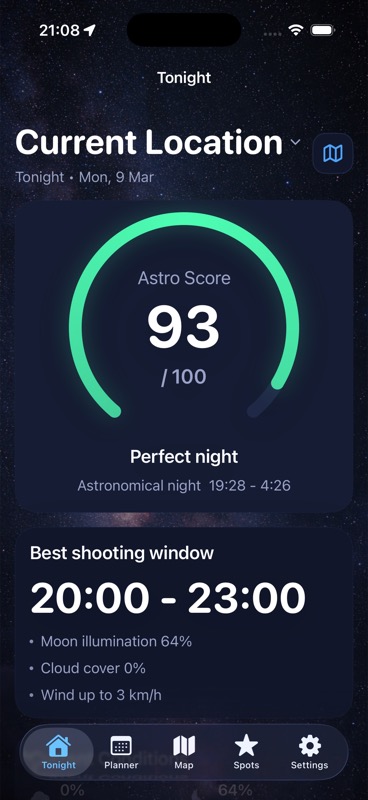
Use DarkScout's cloud and Moon information, target windows, and saved observing spots to plan the night and location. Obtain astronomical seeing and transparency forecasts from a source that explicitly provides those parameters for your region. A weather visibility distance should stay in its own field on the worksheet.
The current App Store listing confirms that all features are free and DarkScout requires iOS 26 or later. The target matrix and field checks above also work with your preferred forecast sources.
Give your target a useful window.
Bring clouds, Moon conditions, target timing, and saved locations into one plan.
Get DarkScout for iPhone All features free · iOS 26 or laterSources and further reading
Published October 18, 2026. Astronomy, forecast-definition, and product sources checked for this guide. The two-night examples are hypothetical and contain no field-test results.