
It is too windy for your planned photograph when the setup cannot remain secure or repeated frames fail your image-quality needs despite practical changes. There is no single wind-speed limit that guarantees safety or sharp stars for every phone, lens, tripod, tracker, and location. Start with the forecast, then make the decision from the actual setup and conditions.
Check current local official weather warnings and site restrictions before travelling. A camera test is an image-quality check, not a reason to override a warning or keep using equipment that is moving or becoming insecure.
Read the wind field before comparing numbers
For each forecast, record its location, time zone, units, valid time or interval, and whether the number describes mean wind, an instantaneous forecast value, or gusts. An hourly display does not by itself mean “the average of that whole hour.” Compare like with like.
For example, the Met Office's forecast guide describes its wind speed as the expected mean at the shown time. Its gust value is the highest speed between the displayed time and the start of the next period. These are that provider's definitions, rather than rules for every app.
The Met Office's wind-measurement explanation describes gust speed using a maximum three-second average. That averaging duration is different from the forecast interval over which a maximum is reported. Neither tells you the exact second a gust will reach your camera.
By comparison, Open-Meteo's hourly parameter documentation labels its wind speed at 10 metres as instantaneous at the forecast time, and its separate gust field as the maximum over the preceding hour. Check the field definition before assigning a forecast number to your shooting interval.
- Units: keep km/h, mph, m/s, or knots explicit. Convert into one unit before comparing providers or nights.
- Timing: note the forecast's update time separately from the time it describes. Check both dates for a session crossing midnight.
- Direction: check the legend. On the Met Office display, the letter names where wind comes from while the arrow points where it is going.
- Missing gusts: mark them as unavailable. Do not treat a wind-speed maximum as a gust forecast, or a blank gust entry as zero gusts.
Check exposure at the observing position
The Met Office notes that height, terrain, and nearby obstacles affect wind. A forecast or open-site measurement is therefore context for a low tripod beside a wall, not a measurement at that camera's position.
Look at the actual support, ground, wind-facing equipment, and intended composition. Note whether the observing position is exposed, and whether a permitted alternative gives useful shelter without losing the view. Inspect the alternative rather than assuming the sheltered side of every obstacle will be calm.
Nikon's telephoto landscape guidance explains that a long lens can catch wind, causing shake or a composition shift, and discusses shelter. That supports checking the equipment's exposure; it does not supply a universal night-photography shutter rule.
Set up according to the support and camera manufacturers' instructions, including locks, mounting, supported load, and stabilization settings. Recheck the assembly after moving it. Avoid adding improvised hanging weights or wind shields without checking the relevant equipment guidance; the aim is a secure setup you can assess.
Make a repeatable frame baseline
Use this comparison before committing the whole session. It is a practical recording method, not a calibrated wind test or a diagnosis from one photograph.
- Choose the intended frame. Use the camera, lens or phone camera, framing, and support position you plan to shoot with. Check focus first. Include a stationary foreground feature if the composition already contains one.
- Record the capture state. Note focal length or selected camera, exposure settings where available, tracking state, focus, stabilization setting, and triggering method. Keep these unchanged for the baseline series.
- Take several comparable frames. Use your camera's supported timer or remote method where available, then avoid touching the support during capture. Note any gust you notice, contact, vibration, or setting change alongside the frame.
- Inspect consistently. Compare the same stars and any stationary foreground at the same review magnification. Look for variation between frames, a shifted composition, or repeated blur that misses your intended output quality.
- Record the result before adjusting anything. Keep the frames that failed as well as the acceptable ones. One sharp frame during a lull does not establish that the rest of the session will remain sharp.
For iPhone Night mode, Apple recommends staying steady until capture finishes and using a solid, secure surface or tripod. Its displayed capture time depends on the scene, and the available Max option extends that time. Record the displayed time for each comparison; if it changes, label the frames accordingly. Do not describe that duration as a manually fixed single shutter exposure.
Soft stars alone do not identify wind. Check focus, tracking or ordinary star motion, condensation, and any contact with the support before drawing a conclusion. Moving leaves alone show subject movement, not proof of camera shake. Use the seeing and transparency guide for the separate question of atmospheric image steadiness.
Change one thing, then repeat
Choose one practical, manufacturer-supported change: correct an insecure connection, adjust the support within its instructions, or move to a checked, permitted position with less exposure. Repeat the baseline with the other capture settings unchanged where possible. Log what changed and compare the same image details.
If you instead change the focal length, exposure strategy, or target, treat that as a new photographic plan and establish a new baseline. It may give you usable images, but the comparison no longer isolates one support adjustment. A shorter capture is not proof that the underlying movement disappeared.
Conditions can change while you test. An improvement after moving is useful evidence for that attempt, but a lull or a changed capture time can also affect the comparison. Keep those uncertainties in the notes. Repeat the check after a meaningful change in conditions rather than relying on the first successful frame.
Continue, adapt, relocate, or stop
| What you find | Practical response |
|---|---|
| Secure setup; repeated frames meet your quality needs | Continue. Keep reviewing results when conditions change. This is a decision for the current setup, not a permanent wind-speed rating. |
| Quality varies and a specific setup issue can be corrected | Adapt. Make one supported change, record it, and repeat comparable frames. Do not assume wind is the only possible cause. |
| The position is exposed; a permitted alternative has a checked view | Relocate. Recheck access, framing, support security, and the sky window, then make a new baseline there. |
| Frames remain unsuitable after feasible changes | Change the goal or stop. Choose a different setup or session only if it is practical; record that as a new plan rather than claiming the original one passed. |
| Equipment will not stay secure, conditions deteriorate, or warnings or restrictions rule out the outing | Stop. Pack away or avoid the trip. A successful test frame does not establish safe conditions. |
If relocation or testing consumes the useful sky window, include that in the decision. The short-session planning guide helps separate actual shooting time from the whole outing.
Copy the field worksheet
Keep one setup record and a short row for each comparison. Blank or uncertain information is more useful than invented precision.
| Field | What to write down |
|---|---|
| Place and time | Exact support position, session dates, time zone, and permitted access. |
| Forecast context | Provider, location, update time, units, wind field definition, gust interval if available, and direction convention. |
| Local exposure | Observed wind direction where known, nearby obstacles, ground and support condition, and any uncertainty. |
| Capture baseline | Camera or phone camera, focal length or framing, exposure or displayed Night-mode time, focus, tracking, stabilization, and trigger method. |
| Quality goal | The details and review scale you will compare, with the intended output in mind. |
For each test series, copy these fields:
- Time and frame references: identify the actual files.
- Observed conditions: gusts noticed, contact, or other changes during capture; distinguish observations from the forecast.
- Result: acceptable, variable, or unsuitable for this goal, with the image detail that led to the decision.
- Single change: what you adjusted, or “none” for the baseline.
- Confounding changes: different capture time, framing, focus, tracking, or conditions that limit the comparison.
- Next step: continue, adapt, relocate, change the goal, or stop; record why.
Do not turn a successful session into a universal personal wind limit. The notes apply to that equipment, configuration, position, and set of conditions. They give you a more useful starting point for the next visit.
Read DarkScout's wind as planning context
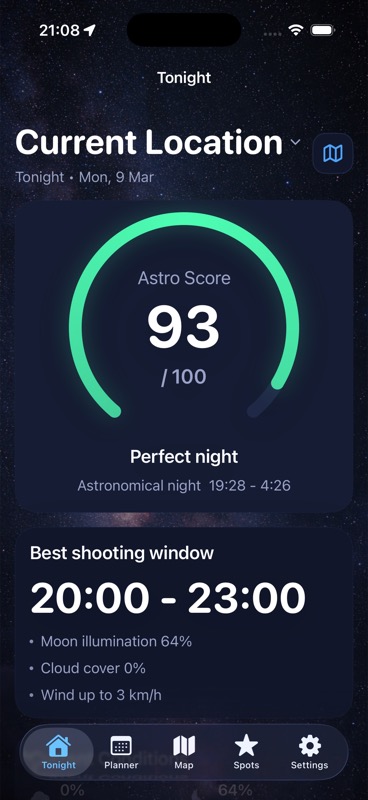
DarkScout uses an hourly wind-speed forecast at 10 metres above ground, displayed in km/h or mph. Its “Wind up to” summary is the highest available wind-speed sample within the chosen window, rather than a gust forecast. Check a separate current source for gusts, wind direction, and official warnings, then assess the real setup on site.
Use that context alongside DarkScout's cloud, Moon, darkness, and saved-spot planning. Its general Astro Score is not a calibrated equipment-stability rating or a guarantee of sharp frames. The current App Store listing describes the free planning app, which requires iOS 26 or later. Capture and frame review happen in your camera and photo tools.
Plan the night before you set up.
Compare clouds, Moon conditions, and saved observing spots, then check the actual equipment and local conditions.
Get DarkScout for iPhone All features free · iOS 26 or laterSources and further reading
- Met Office: What does this forecast mean? — that provider's mean wind, gust interval, and direction display.
- Met Office: What is wind and how do we measure it? — gust averaging and the influence of height, terrain, and obstacles.
- Open-Meteo: Weather Forecast API — separate hourly wind-speed and gust field definitions.
- Nikon: Super Telephoto Lenses for Landscapes — wind exposure and repeated sharpness checks; its daylight exposure advice is not used here.
- Apple: Use Night mode on your iPhone — secure support, capture duration, and keeping the phone steady.