
Start by finding a star in the camera's view, refine focus with the controls your camera supports, then inspect a captured frame. Keep the successful frame as a reference before beginning a longer sequence.
This guide is for a camera with an interchangeable lens. For touch focusing and AE/AF Lock on a phone, use the iPhone night-sky guide.
Prepare the controls and composition
- Confirm the setup: camera, lens, intended focal length, and composition.
- Find the controls: focus mode, preview magnification, and captured-image review in the relevant manuals.
- Stabilize the camera: prepare a supported release or delay method before testing.
- Keep a record: note any temporary aid or setting that must be restored.
Camera aids differ. For example, Nikon's Z 9 article describes Starlight View brightening the display and helping low-light autofocus. Its display brightness does not change the final image. Check your model's supported aids rather than assuming autofocus is always unavailable or every camera has that feature.
Find a star before refining focus
Choose a visible star for the focusing check. Nikon's D810A example explains that a badly defocused star can disappear from Live View. Moving focus near infinity can help reveal it; then magnify the preview and refine manually toward the smallest, sharpest appearance.
Near infinity is a starting point. Sony's night-sky guidance warns that turning the focus ring to its farthest position does not establish sharp focus. Verify the star instead of accepting the ring position.
Make a small, controlled adjustment
Canon's tutorial with Matt Vandeputte uses manual focus and an enlarged preview. Make gentle adjustments while comparing the same star. Magnify the preview without changing lens zoom.
Keep the useful position, return to the intended composition, and avoid moving the focus ring while reframing, as Sony advises. If you changed capture settings during setup, restore the intended ones before verification.
Inspect a captured frame
Canon recommends an enlarged review of a test photograph. Use the intended setup and release method; record the file and what you checked.
For a controlled comparison, retain the same lens, focal length, framing, capture settings, and review scale while changing focus. If another variable changes, record it and avoid attributing the whole difference to focus. Repeat the chosen position to check whether the result is consistent.
Choose the next check
| What you find | Next useful action |
|---|---|
| No star is visible in the preview | Check the pointing and rough focus before attempting a fine adjustment. |
| The ring is at its farthest position | Inspect the star; the ring position alone is insufficient evidence. |
| The preview looks convincing | Review a captured frame before accepting the setting. |
| Captured stars are elongated | Check motion and exposure separately from focus; change one variable per comparison. |
| Zoom or the setup changes | Make another captured-image check rather than relying on the earlier result. |
Canon separates exposure-related trails from focus. Shape alone is not a complete diagnosis. Check support or dew when relevant; deliberate trails have a separate sequence guide.
Recheck after a relevant change
The Canon EF17–40mm f/4L USM manual says to finish zooming before focusing because changing zoom can affect focus. It also documents infinity compensation for a temperature-related shift. These are documented lens-specific examples: use your own lens instructions and another image check after a relevant change, rather than assuming every lens behaves identically or imposing a fixed recheck interval.
Sony also notes that selecting autofocus can change an established focus setting. Check how the next shutter press behaves on your camera. Retain the reference image so you can compare the setup again later.
Copy the focus-check worksheet
Fill this with your own checks, leaving uncertain entries explicit.
- Setup: camera, lens, focal length, and manual references.
- Method: star used, focus mode, preview aid, and temporary settings.
- Comparison: frame references, unchanged controls, and the one adjustment.
- Observation: what you inspected in each captured image, without a guessed cause.
- Before the sequence: intended composition/settings restored, final reference, and changes that require another check.
Plan the sky window separately
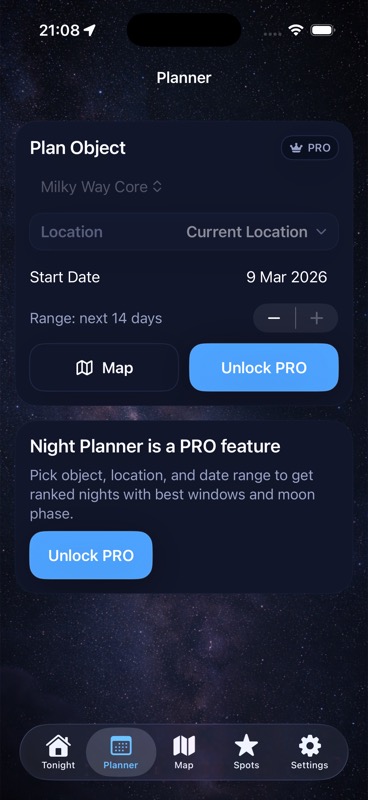
Use DarkScout to compare Moon and cloud context, choose an observing location, and plan the night. Do focusing and photograph review on the camera. The Planner screenshot above illustrates night planning.
The current App Store listing describes the free iPhone app, requiring iOS 26 or later. Keep the focus record beside the planned window.
Choose the night for your camera session.
Compare Moon, clouds, and a saved observing spot before setting up.
Get DarkScout for iPhone All features free · iOS 26 or laterSources and further reading
- Nikon: Landscape Astrophotography with the D810A — finding and refining a star in Live View.
- Canon: Astrophotography with Matt Vandeputte — manual focus and captured-image checks.
- Sony: Photographing the night sky — focus-ring limits and preserving focus.
- Canon EF17–40mm f/4L USM manual, ENG-5–6 — zoom and infinity compensation.
- Nikon: Five Z 9 Features That Aid in Night Photography — model-specific display and focusing aids.